


Manual for testing a PSU with this Digital Electronic Load
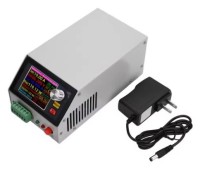
This device does not come with a user guide, so I found out how it works,
How to use this digital electronic load for testing PC Power Supply Unit
This device does not come with a clear manual, so I had to find out myself how it works.
The button MEUN means of course MENU (too difficult for Chinese developers to find the right translations or a copyright issue??).
Testing a power supply works as follows.
First connect with a short red wire I+ and V+ and with a short black wire V- and I-.
Testing the PSU with (for instance) the next settings: voltage +5V and power 10W.
Connect the device to the 5V output line and GND. Turn on the device. Switch on your PSU and the voltage should show 5V on the display.
Connect the device to the 5V output line and GND. Turn on the device. Switch on your PSU and the voltage should show 5V on the display.
Press 2x the yellow MEUN button. Turn the metal knob until Mode shows: CP (Constant Power).
Press again MEUN, and use the rotating knob for setting it to 010.0W (pressing the knob changes the position of the cursor, turning it changes the value).
Press 2x the MEUN button. Now you can change the protection values.
For 5V I change the Over Voltage Protection to 5.3V (this value has to be somewhat higher than the input voltage).
Press again MEUN. Set the Over Current Protection to 2.20A.
Press MEUN, and set Over PowerProtection to 10.6W.
Press MEUN and set the Stop voltage to 4.8V, press MEUN and set the testing time minutes (change values with rotating knob) press MEUN and then the hours.
Press MEUN again, and you are done.
Press R/S (red DSG led is switched on) and the resulting values are displayed. Now you can observe if the PSU can hold the right values over time.
Press R/S (red DSG led is switched on) and the resulting values are displayed. Now you can observe if the PSU can hold the right values over time.
Want to build a project?
Bring your design to life with the Elektor PCB Service, powered by Eurocircuits. Upload the project files and order professionally manufactured PCBs or assembled boards through a proven European production platform.
Supporting KiCad, Eagle, Gerber, and ODB++ formats, the service is suitable for everything from prototypes and validation builds to series production and volume manufacturing.
Made in Europe. Fast. Reliable. Professional.
Diskussion (0 Kommentare)