


Elektuur Retro Lettering
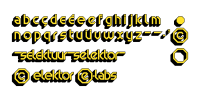
Octagonal lettering used in Elektuur in the 1980s.
This SVG stroke font can be used with the Hershey Text extension included in Inkscape 1.1.1 to recreate the octagonal geometric lettering used in Elektuur in 1983-1985. It contains lower-case letters only but adds an updated e (somewhat like the one used since the end of 2012).
To install oktuur.svg, copy the file into the svg_fonts folder as configured in menu Edit→Preferences…→System in the Inkscape extensions field (usually something like Inkscape/share/inkscape/extensions/svg_fonts).
To use it, go to menu Extensions→Text→Hershey Text…
and configure:
→Render
Font face: Other (given below)
Name/Path: oktuur.svg
(→Apply)
And optionally go to:
→Utilities
Action: Generate glyph table in selected font
→Apply
(Apache's Batik provides better SVG font support and displays all 3 included fonts.)
To install oktuur.svg, copy the file into the svg_fonts folder as configured in menu Edit→Preferences…→System in the Inkscape extensions field (usually something like Inkscape/share/inkscape/extensions/svg_fonts).
To use it, go to menu Extensions→Text→Hershey Text…
and configure:
→Render
Font face: Other (given below)
Name/Path: oktuur.svg
(→Apply)
And optionally go to:
→Utilities
Action: Generate glyph table in selected font
→Apply
(Apache's Batik provides better SVG font support and displays all 3 included fonts.)
Want to build a project?
Bring your design to life with the Elektor PCB Service, powered by Eurocircuits. Upload the project files and order professionally manufactured PCBs or assembled boards through a proven European production platform.
Supporting KiCad, Eagle, Gerber, and ODB++ formats, the service is suitable for everything from prototypes and validation builds to series production and volume manufacturing.
Made in Europe. Fast. Reliable. Professional.
Updates des Autors